
Stop Wasting AI Tokens

If you've ever dragged a PDF straight into Claude or ChatGPT and watched your token usage jump way more than the document seemed to justify, there's a specific reason for that — and it has nothing to do with how much text is actually in the file.
The Real Cost of Uploading a PDF Directly
When you upload a PDF to an AI chat tool, it usually isn't just reading the words off the page. According to Anthropic's own documentation for Claude, PDF pages are processed as a combination of an image and extracted text — which means every page typically costs somewhere in the range of 1,500 to 3,000 tokens, largely regardless of how much is actually written on it. There's no separate "PDF fee" — it's billed as standard input tokens, just a lot more of them than you'd expect.
That adds up fast. A 40-page project report could cost 60,000–120,000 tokens just to upload — even if a good chunk of every page is a repeated header, a page number, and empty margin. The AI processes each page as an image every single time, whether that page is packed with unique content or is mostly boilerplate.
Plain text works very differently. A dense page of prose typically runs somewhere in the ballpark of a few hundred tokens as plain text — a fraction of the image-plus-text cost of uploading that same page as part of a PDF.
Where This Actually Matters (and Where It Doesn't)
To be fair, image-based PDF processing exists for good reason. If your document is full of charts, scanned tables, diagrams, or handwritten notes, you want the AI actually seeing the page — not reading a flattened text dump that loses all that visual structure. For documents like that, uploading the PDF directly is the right call.
But for text-heavy documents — reports, papers, contracts, project docs, meeting notes — you're paying that same per-page image-processing overhead for content that's just text. You don't need the AI to see a page of paragraphs; you need it to read them. That's exactly the case where uploading the raw file is the expensive way to do it.
What I Built: A PDF Token Optimizer
I kept running into this while feeding my own project reports into AI tools, so I built a tool to fix it: a PDF Token Optimizer, now live and free on ToolFesto.
Instead of uploading your PDF as a file, you drop it into the tool, it extracts and cleans the real text content right in your browser, and you paste that — as plain text — into your chat instead of attaching the file. Same information, none of the image-processing overhead.
How It Works
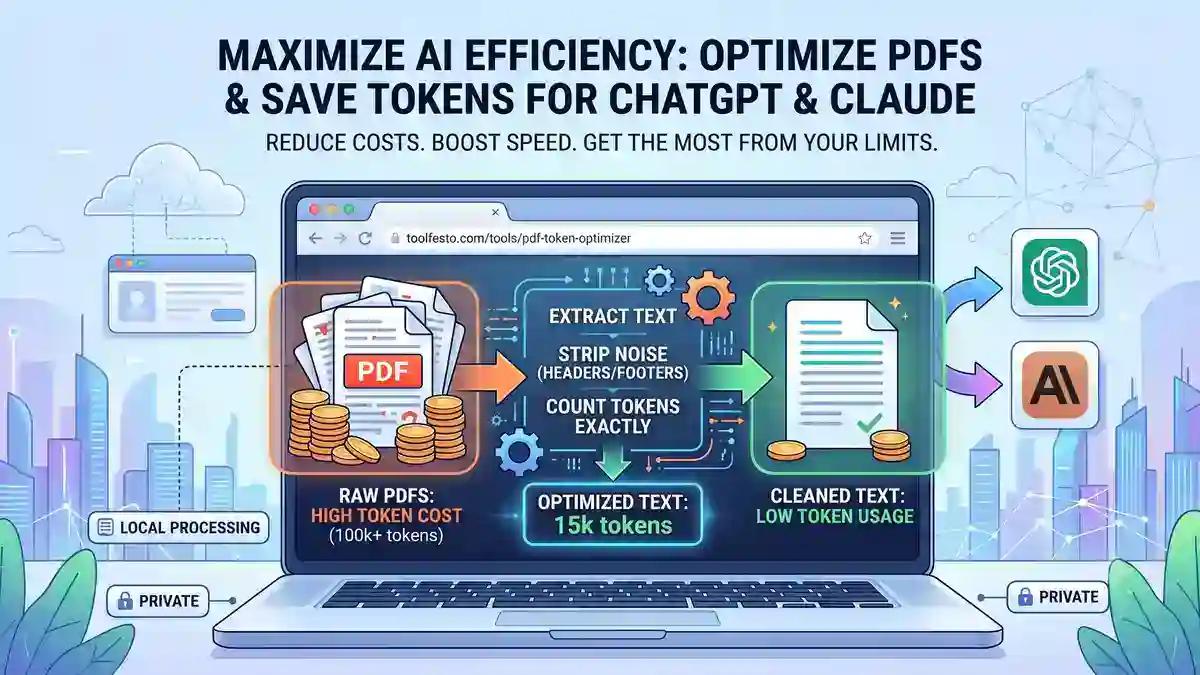
Everything runs entirely in your browser — nothing is uploaded to a server. Here's the pipeline under the hood:
- Parse the PDF locally. The tool reads the raw text and the exact position of every character on every page, using the same open-source engine that powers PDF viewing in Firefox.
- Rebuild real structure. Instead of just dumping characters in the order they appear, it reconstructs lines, words, and tables based on how far apart things actually are on the page — so a table stays a table, and two words stay two words instead of merging into one.
- Strip the noise. Headers, footers, and repeated boilerplate that show up across most of the document's pages get automatically detected and removed — while a document's actual title, page numbers, and one-off notes stay untouched.
- Count tokens exactly. The cleaned text is run through the same byte-pair-encoding tokenizer used by GPT-4 and Claude, so the token count you see is the real number you'll be working with — not an estimate.
- Copy or download. Grab the cleaned text straight into your clipboard, or download it as a
.txtfile ready to paste into your next prompt.
Does It Actually Make a Difference?
Two things stack in your favor here. First, extracted plain text for a typical page is usually a fraction of the ~1,500–3,000 tokens a page costs as a direct PDF upload, since you're no longer paying the image-processing overhead at all. Second, on top of that, the tool strips out the noise baked into most real documents — in one real report we tested, simply removing repeated headers and footers cut the cleaned file down by more than 10%, before even counting the savings from skipping image processing entirely.
For a long, text-heavy document, that's the difference between the AI seeing the whole thing clearly within your token budget, or getting cut off partway through.
Who This Is For
- Students and researchers who want to paste papers or reports into AI tools for summaries or study help, without spending their whole message limit on one document
- Developers feeding API docs or specs into an AI coding assistant
- Professionals who need to get long PDFs — contracts, reports, project docs — into a chat without hitting a wall
- Basically, anyone about to attach a "short" PDF and wondering why it's about to eat their entire token budget
Try It
The PDF Token Optimizer is live now on ToolFesto — free, no sign-up, and nothing ever leaves your browser. Next time you're about to attach a text-heavy PDF to an AI chat, try pasting the cleaned text instead — it's worth keeping in your back pocket.
Got a document that trips it up, or a feature you wish it had? I'd love to hear about it — this is very much a living tool, and real-world PDFs are exactly what make it better.