
Why Most Online Rulers Are Wrong (And How to Fix It)

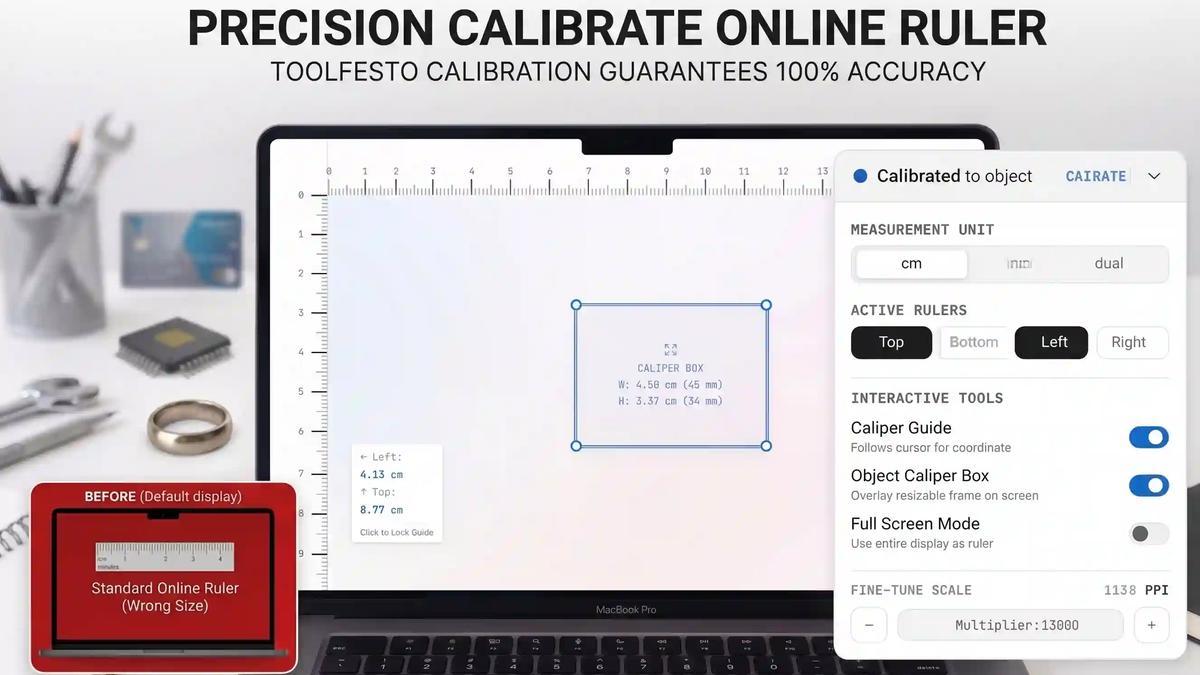
Have you ever searched for an "online ruler" to quickly measure a screw, a piece of jewelry, or a digital mockup on your screen? If so, you’ve probably noticed a glaring problem: the measurements are almost always wrong.
Why? Because of the "Pixels vs. Physical Reality" problem. Screens operate in logical pixels. A 13.3-inch laptop and a 27-inch desktop monitor can have the exact same 1920x1080 resolution, meaning a 1-inch ruler rendered on one screen will be physically larger or smaller on another. The browser simply doesn't know the physical size of your monitor.
Until now.
We built the ToolFesto Online Ruler to bridge the gap between digital pixels and physical reality. It isn't just a static image of a ruler—it's a precision-engineered, CAD-grade measurement tool right in your browser.
Here is a look under the hood at how it works, and how you can use it to get 100% accurate, real-world measurements on any device.
The Secret to 100% Accuracy: 3-Step Calibration
To give you actual physical sizes (Centimeters, Millimeters, and Inches), the ToolFesto Online Ruler calculates your exact Pixels Per Inch (PPI). We offer three easy ways to calibrate your screen in seconds:
- Screen Diagonal Calibration: Know your screen size? Just type in your diagonal measurement (e.g., 15.6" or 24"). Using the Pythagorean theorem, our engine calculates the exact PPI based on your screen's current resolution.
- Device Preset Auto-Detection: Our tool automatically queries your screen parameters against a built-in database of Apple MacBooks, iPads, iPhones, and standard monitors. Factoring in High-DPI (Retina) scaling, it can auto-select factory-verified PPI values.
- Physical Item Sizer (The "Life-Hack" Method): Don't know your screen specs? No problem. Grab a standard Credit/Debit Card, a US Quarter, or a 1/2 Euro coin. Place it against the screen and slide the calibration bar until the on-screen template perfectly matches your physical item. Presto! Your screen is perfectly calibrated.
More Than a Ruler: CAD-Grade Precision Tools
Traditional online rulers are passive. ToolFesto's ruler operates like a set of digital vernier calipers for your viewport, powered by an optimized HTML5 Canvas engine.
Interactive Caliper Crosshairs Need to track an exact measurement? Our crosshairs follow your cursor, showing distance from all active boundaries simultaneously.
- Desktop Lock: Hover to position, then click anywhere on the blank canvas to lock the guide in place. You can now slide your physical object off the screen and read static values. Click to unlock.
- Mobile Touch Tracking: Drag a finger inside the canvas to position the crosshairs; they persist at that exact position when you lift your finger.
The Draggable & Resizable Caliper Box Measure digital mockups, components, and print sizing directly on your screen. You can drag an overlay box onto any visual component to see its exact width and height. For pixel-perfect adjustments, use your keyboard:
- Arrow Keys: Nudge the entire box position.
- W / A / S / D: Shrink or grow the dimensions.
- Shift + Key: Hold Shift to jump in faster 10px increments.
Customizable Workspace Maximize your space with one-click Native Fullscreen integration. You can toggle Multi-Edge Rulers (Top, Bottom, Left, Right) and switch between Centimeters, Inches, or Dual Scale Mode (displaying Metric and Imperial simultaneously for easy conversion). Plus, your calibration and unit preferences are saved locally, so everything is exactly how you left it the next time you open the tool.
Privacy-First & Completely Offline
Whether you are in a corporate environment, a secure workspace, or on a low-bandwidth connection, the ToolFesto Online Ruler respects your privacy.
The tool operates 100% client-side directly within your browser. It does not send your screen dimensions, images, or input coordinates to any server. It is completely secure and lightning-fast.
Frequently Asked Questions
How do I know if the online ruler is rendering actual size? Because screen pixels vary by device, an online ruler requires calibration. Simply click "Calibrate" on our tool, align a standard credit card, or input your screen's diagonal size. The ruler scale will instantly adjust to absolute physical size.
Can I use my mobile phone as a ruler? Yes! Open the tool on a mobile browser. While mobile displays are compact, they are perfect for measuring items under 4 to 5 inches (10–12 cm). Just remember to calibrate using a standard card or coin before measuring.
What is Dual Scale Mode? It allows you to display both inches (Imperial) and centimeters/millimeters (Metric) on the screen borders at the exact same time, making real-world conversions and audits extremely simple.
How do I move the caliper box precisely? Click the caliper box to focus it. You can then move it pixel-by-pixel using the Arrow keys, and adjust its width and height using the W/A/S/D keys. Hold down the Shift key to move in faster, 10px increments.
Ready to measure? Throw away the tape measure and try the ToolFesto Online Ruler today!